

All-in-one ERP
Prospiro ERP
Sales, stock, purchasing, finance, production, e-commerce, POS, CRM and field teams in one connected system, with 24 modules.
Explore the ERPProspiro ERP · Built in Dubai, built for the world
No more re-typing orders, chasing stock counts or rebuilding reports by hand. Prospiro ERP connects sales, stock, purchasing, finance, production, e-commerce, POS and field teams, so a sale made on the route reaches stock, the invoice and the ledger in one flow.
Solutions
Every problem below comes with how Prospiro solves it and what we assure, because it is built into how the system works.
Our stock never matches the system.
Customers pay late and cheques go missing.
The shop and the website sell the same item twice.
We hear about field sales a day late.
We run out of fast sellers and overstock the rest.
We are not sure our invoicing is e-invoicing ready.
Every company in the group runs its own system.
Month-end takes weeks of spreadsheets.
Production stops when a material is missing.
Leads come in, but too few are followed up.
Prospiro products
Prospiro ERP runs the whole business. Four specialist products run freight forwarding, 3PL warehouses, courier companies and delivery fleets. Their full product pages are on synergiasoft.com, the website of Synergia, which builds Prospiro together with Solidius.
All-in-one ERP
Sales, stock, purchasing, finance, production, e-commerce, POS, CRM and field teams in one connected system, with 24 modules.
Explore the ERPFreight & customs
Quotes to bookings, house and master bills, job costing, and customs declarations with duty, VAT and deposit tracking.
View productWarehousing
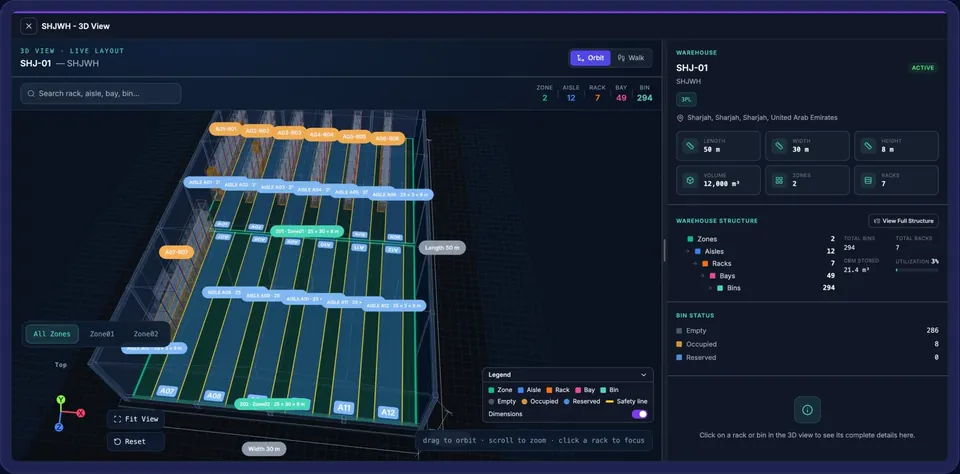
Customer-owned stock, ASNs, SSCC putaway, a live 3D warehouse view, contract billing and a client portal.
View productCourier companies
Merchant portal, offline driver app, hub sorting, route plans, live tracking, COD and billing.
View productOwn-fleet delivery
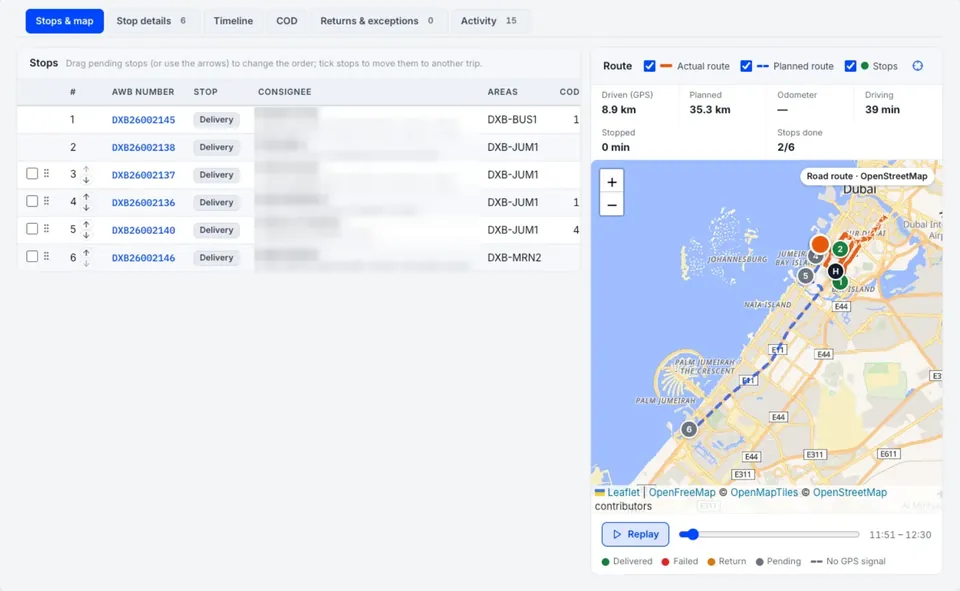
Road-optimised dispatch, live tracking, an offline driver app, proof of delivery with GPS, COD and online store connectors.
View productInside Prospiro ERP
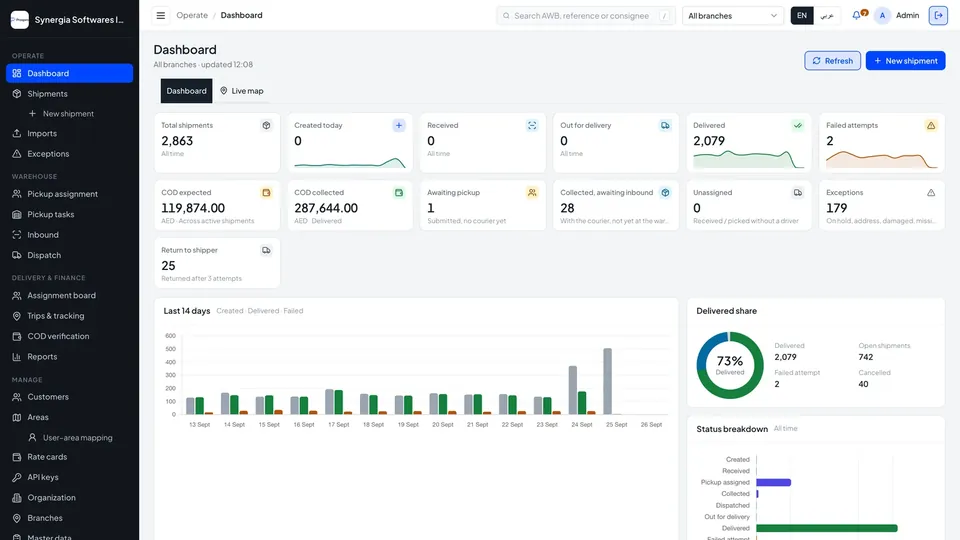
The Prospiro ERP home screen, redrawn with sample data.
One connected system
Every module reads and writes the same data. Pick one to see the modules it works with.
Commercial6 modules
Operations6 modules
Management6 modules
Platform6 modules
Sell everywhere
Your online store, your POS terminals and your vans sell from the same products, prices and stock, and every sale lands in the same books.
E-commerce
NewPoint of Sale
Field Sales
In the product
Real Prospiro screens with sample data.
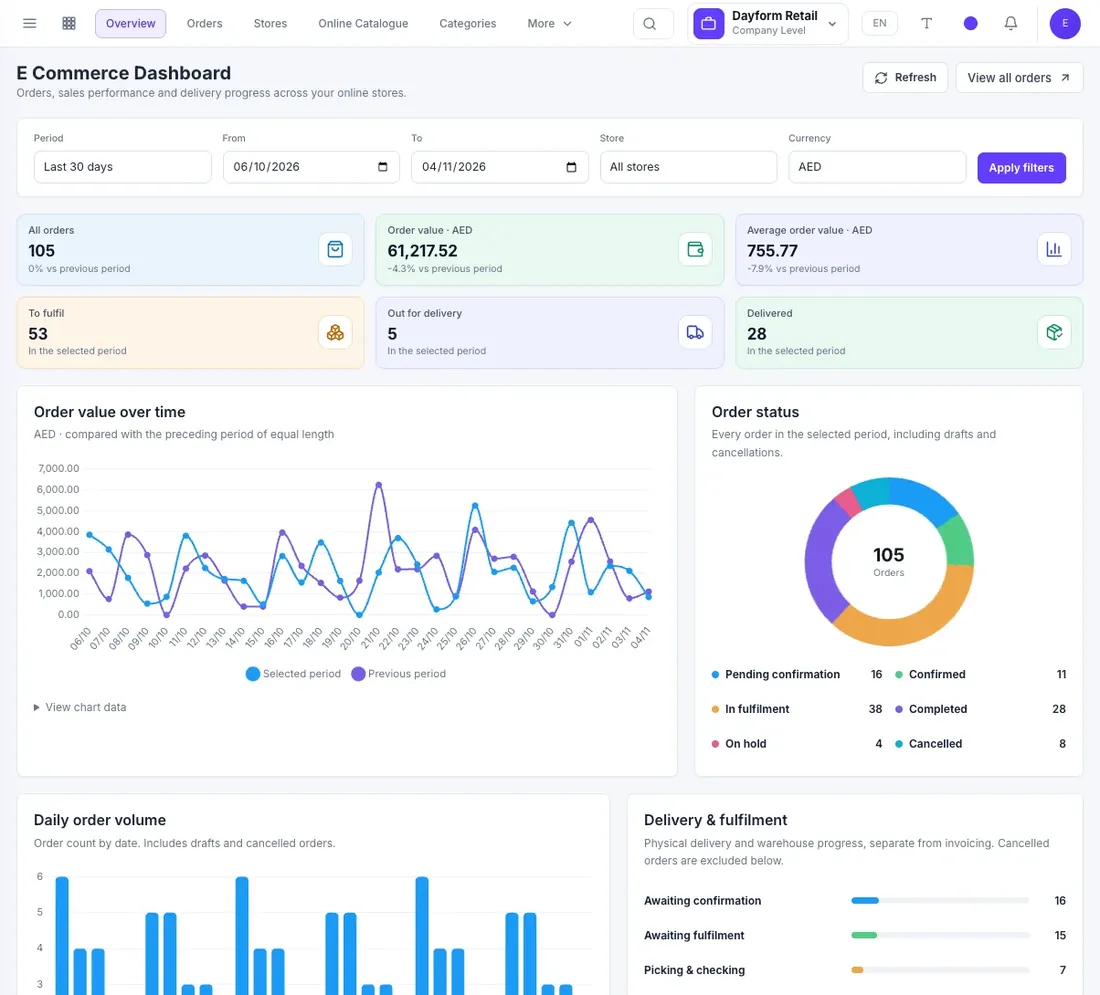
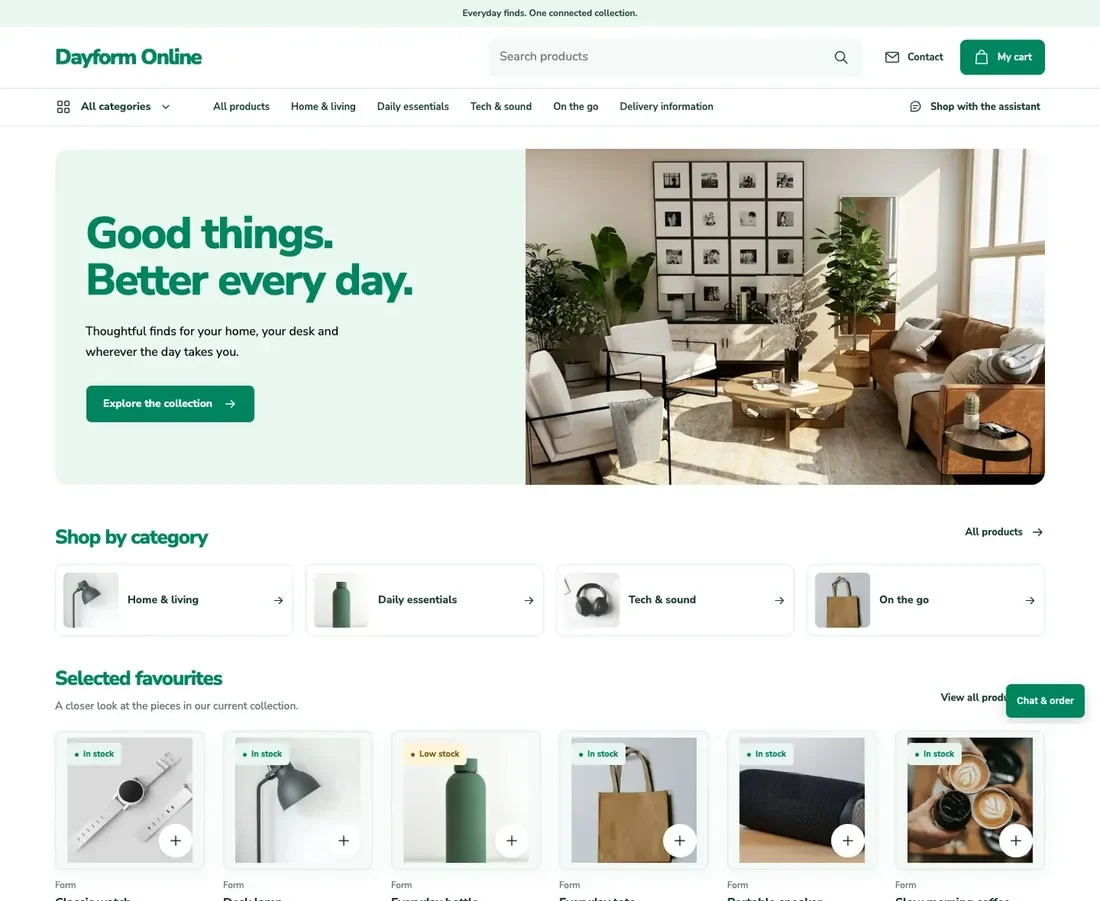
CRM & Outreach
Leads, deals and email campaigns live in the same system as your orders and invoices, so sales can see the whole customer.
CRM
Outreach
NewConnected workflows
An order becomes a delivery, an invoice and a receipt without anyone typing it twice. Each step picks up where the last one finished.
From a customer order to the books.
Sales · Pricing
Capture products, packages, pricing, terms and the required approvals.
Inventory · Logistics
Check availability and follow quantities through picking, delivery and fulfilment.
Sales · Finance
Connect the sale to the customer invoice and the right financial entries.
Finance · Receivables
Record the customer receipt and follow the outstanding balance.
From a supplier commitment to stock value.
Purchase
Set the supplier, products, packages, quantities and expected delivery.
Inventory · Receiving
Record actual receipts, tracking details and any remaining quantities.
Purchase · Finance
Connect the received goods with the supplier bill and GRNI clearing.
Finance · Payables
Track the payable and record the supplier payment in Finance.
From a production plan to finished goods.
Production planning
Use a BOM or recipe to define the output and calculate material requirements.
Production · Inventory
Review stock readiness and reserve the materials the order needs.
Production
Record consumption, output and quality decisions as the work happens.
Inventory · Finance
Trace finished goods, WIP and the matching financial postings.
From an online basket to a delivered order.
E-commerce · Inventory
Publish Inventory products with web content, live prices and available stock.
E-commerce · Sales
The customer verifies their email and checks out. The order arrives in Sales as a draft.
Sales · Logistics
Your team confirms availability and delivery, then picks, checks and dispatches the goods.
Finance · E-commerce
Issue the customer invoice and send the order emails you set up for each event.
From the first sale to a closed cashier session.
Point of Sale
Choose the permitted terminal and begin the cashier session.
POS · Pricing · Inventory
Price the basket, accept an eligible tender and complete the sale.
POS · Finance
Use the authorized return and refund flow when a customer brings an item back.
POS · Finance
Submit the session and compare tenders, returns, cash movements and the count.
From loading the van to settling the day.
Field Sales · Area & Route
Confirm the salesperson, route, day session and the van stock loaded for the day.
Field Sales · Pricing
Work the planned customers and capture orders, spot bills, collections or returns.
Field Sales
Work captured offline is checked by the server, and any failed item is resolved.
Field Sales · Inventory · Finance
Complete the unload, the stock and cash count, and the office day-close review.
From a new enquiry to a confirmed order.
CRM
Leads come from your website, Meta Lead Ads, WhatsApp and other configured channels, or by import.
CRM
Record the customer need, owner, stage, stakeholders, value and next contact.
CRM · Outreach
Plan activities and run email outreach sequences that stop when the contact replies.
CRM · Sales
A won opportunity continues into the quotation and the sales order.
From a posted invoice to a reconciled e-invoice.
Finance · E-Invoicing
Post the invoice in Finance and create its electronic record.
E-Invoicing
Run the configured validation and correct the source where something fails.
E-Invoicing
Send the invoice through your configured provider and follow its status.
E-Invoicing · Finance
Record acceptance, or investigate an unclear result before deciding to resend.
Industries
Five blueprints map the roles, decisions and exceptions of each kind of business to the Prospiro modules that handle them.
Keep stock, sales and cash in the same conversation, from buying and storing to selling, delivering and collecting.
Give field sales and delivery users a structured day, with stock accountability and their commercial work connected to the office.
Run the shop counter and the online store from one operational picture, with shared pricing, stock and the financial documents behind each sale.
Follow materials all the way to finished output, with stock availability, quality decisions and cost in your books.
Keep client work, project milestones, team tasks and support tickets in one shared operational picture.
Beyond the office
Vans, store counters and company phones stay connected to the same system as finance and the warehouse.
Field Sales & Distribution
Route journeys, van stock, field orders, spot billing and collections. Load requests and returns stay accountable from approval to receipt.
Offline capture
Store terminals and field users capture work offline when your policy allows it. It syncs later, and the server validates it before anything is posted.
Mobile Device Management
Enroll Android devices with Android Enterprise, apply policies for screen lock, camera and kiosk mode, and keep the device inventory current.
Knowledge Center & AI Assistant
Ask how a process works and get help that understands the screen you are on. Actions it suggests stay within your permissions.
UAE & GCC
Tax, e-invoicing, languages and multi-company structures are part of the product, set up for your companies and branches.
UAE & GCCSynergia, which builds Prospiro together with Solidius, is a Peppol member. Prospiro’s E-Invoicing module takes each invoice from Finance, checks it, submits it through your configured provider, then monitors and reconciles the outcome.
Interfaces in almost any language your teams need, including Arabic with right-to-left layouts for screens and printed documents.
Run several companies and branches in one system. Each company keeps its own books, and branch context follows terminals, stock and documents.
Tax rules, combined taxes and reverse-charge settings, each mapped to the right control accounts.
Central print templates for invoices and delivery notes, with QR and watermark options and a log of every output.
All modules
Each module has its own page with features, worked examples and answers to common questions.
Prospiro Family
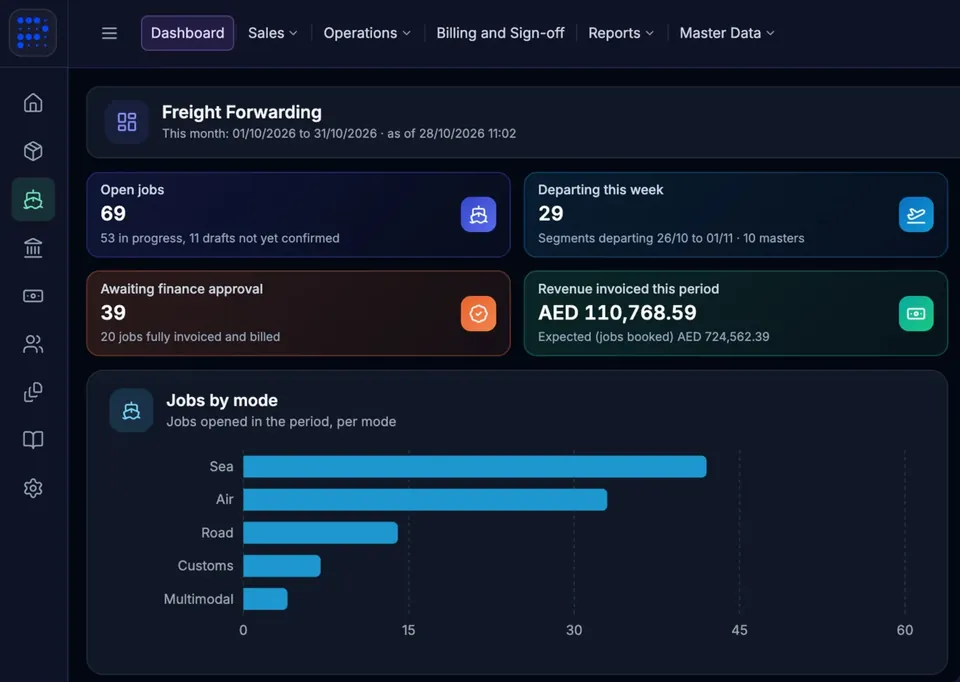
Freight forwarders, 3PL warehouses, courier companies and businesses with their own delivery fleet each get a Prospiro product built for their work. Full details are on synergiasoft.com.
Freight & customs
Run every freight job from quote to invoice.
Warehousing
Run one warehouse for many customers.
Courier companies
Run a courier company from pickup to remittance.
Own-fleet delivery
Deliver your own orders on time.
At a glance
The short version, for your team and for anyone comparing ERP systems in the UAE.
| What it is | A cloud ERP (SaaS), billed monthly |
|---|---|
| Who makes it | Solidius, built together with Synergia Softwares IT Infrastructure LLC |
| Where | Built in Dubai, United Arab Emirates, for businesses in the UAE and the GCC |
| Modules | 24 connected modules with 560+ documented features |
| Runs on | Web, Android and iOS; field and POS users can work offline |
| Languages | Almost any language, with right-to-left Arabic layouts |
| Built for | Trading, distribution, retail, e-commerce, production, field and service businesses |
| Companies | Several companies and branches in one system, each with its own books |
| E-invoicing | Checks, submission through your configured provider, monitoring and reconciliation |
| Credentials | Synergia is certified to ISO/IEC 27001 and ISO 22301, and is a Peppol member |
| Pricing | Monthly subscription; implementation, migration, customisation and training priced for your scope |
Prospiro is a cloud ERP for trading, distribution, retail, e-commerce, production, field and service businesses. Sales, inventory, purchasing, finance, production, the online store, POS, field sales, logistics and support work from the same records, so each step updates the next. Prospiro is by Solidius, built together with Synergia Softwares IT Infrastructure LLC in Dubai.
Yes. Prospiro is a cloud ERP (SaaS), billed monthly. It runs in the browser and on Android and iOS apps, so there are no servers or desktop installations to manage. Implementation, data migration, customisation and training are priced separately for your scope.
Businesses in the UAE and the GCC that trade, distribute, sell in stores or online, produce goods, or run field and service teams, and want sales, stock and finance in one system. It works for a single company or for several companies and branches.
Yes. Prospiro is multilingual and works in almost any language your teams need. Arabic screens use right-to-left layouts. Tell us which screens your team uses most and we will show them in the demo.
Yes. The E-Invoicing module takes invoices from Finance through checks, submission through your configured provider, monitoring and reconciliation of each outcome. Synergia, which builds Prospiro together with Solidius, is a Peppol member.
Yes. The E-commerce module publishes products from your inventory with live prices and stock, with categories, brands, banners and SEO details for each page. Orders from the cart and checkout arrive in Sales for your team to confirm.
Yes, where your offline policy allows it. POS terminals and field users capture work without a connection. It syncs when they are back online, and the server validates it before it becomes a posted transaction.
Yes. Each company keeps its own books, and company and branch context applies to terminals, stock and documents.
Synergia Softwares IT Infrastructure LLC, which builds Prospiro together with Solidius, is certified to ISO/IEC 27001 for information security management and ISO 22301 for business continuity management. Synergia is also a Peppol member for electronic invoicing.
Book a demo
Tell us what you sell, stock and deliver. We plan the session around the modules you need, in English or Arabic.
Prefer email? info@prospiro.ai
Book a demo
A session with our team in English or Arabic, planned around the modules you need.
Prospiro products
Your request is with our team. We will contact you soon to plan your demo around your modules and the way you work.